Battery Change Guide Tempdrop 2
Tempdrop 2.0 Advanced Monitor Battery Change Guide
Access Point: The sensor's battery is located beneath a slide-out lid at the top.
Battery Replacement Tool: Only use the provided Tempdrop pin tool for unlocking. Utilizing other pins or tools will damage the sensor.
Depth Caution: Inserting any tool or pin deeper than 2.5mm will damage the sensor and may void its warranty.
Battery Type: The sensor is specifically designed for CR2032 batteries. Use only the required battery.
No Modifications: Do not place foreign objects into or make alterations to the battery compartment.
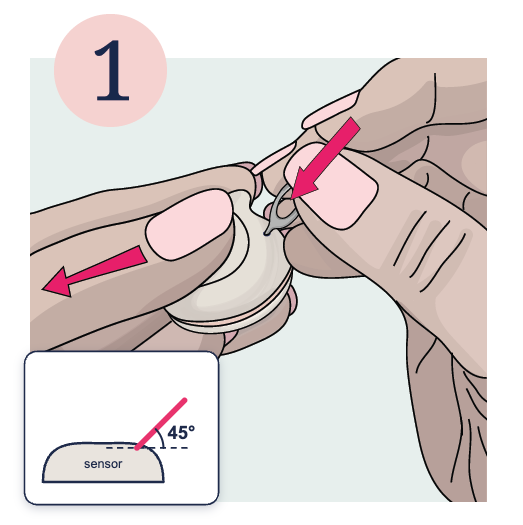
- Unlock the Lid: Insert the provided pin tool into the unlocking hole at a 45 degree angle. Gently apply light sliding pressure to the lid with your thumb and press the pin to unlock the lid.
|
- Remove the Lid: Once unlocked, slide the lid open and remove it to reveal the battery.

|
- Eject Old Battery: Using your fingernail, gently press on the battery's edge to lift and remove it.

|
- Insert New Battery: Position the CR2032 battery with the writing side up. Ensure the battery is oriented correctly

|
- Close and Lock the Lid: Gently press down on the battery. Carefully place the lid into the grooves and slide it over until it locks.

|
- Verify: The Tempdrop sensor is ready for use.

|
.png)


